¶ Game Development
¶ Portions of Games that hit 1,000 reviews in 2025
The following excerpt is from https://howtomarketagame.com/2025/12/15/leftover-research-from-2025/
I copied it here my later reference.

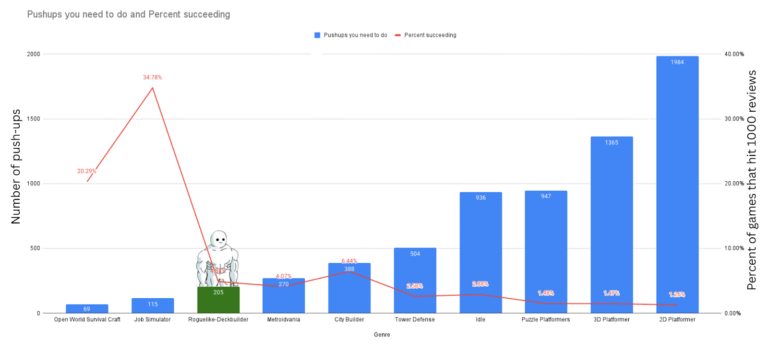
So I calculated the number of pushups you need to do using vginsights database tool.
If you read this comic on January 1st 2025, you would have to do 205 pushups this year. I can do that. I am not as buff as that dude in the comic.
Side note: 10 Roguelike deckbuilders hit 1000 reviews (my unofficial barometer of success). Giving games a 4.87% success rate.
Here are how many push ups you would have to do for other genres in 2025. I put % of games that hit 1000 reviews in parenthesis[ed].
69 push-ups for Open World Survival Craft (20%)
115 push-ups for Job Simulator (34.7%)
205 pushups for Roguelike-Deckbuilder (4.87%)
270 push-ups for Metroidvania (4%)
388 push-ups for City Builder (6.4%)
504 push-ups for Tower Defense (2.57%)
936 push-ups for Idle (2.88%)
947 push-ups for Puzzle Platformers (1.47%)
1365 push-ups for 3D Platformer (1.46%)
¶ UE57 FAQ
What does the UE Editor "Refresh Visual Studio Project" mean?
"Refreshing Visual Studio project" in the context of Unreal Engine 5.7 refers to updating the Visual Studio solution (.sln file) and project files to include any changes made within the Unreal Editor, such as adding new C++ classes or plugins.
¶ Methods to Refresh Unreal Engine 5.7 Projects in Visual Studio
There are two primary methods to refresh your project files for use with Visual Studio:
¶ Method 1: Using the Unreal Editor (Recommended for most cases)
- Open the Unreal Editor for your project.
- Navigate to the menu bar and select Tools > Refresh Visual Studio Project.
This will update the project files, and when you return to Visual Studio, it will prompt you to reload the solution with the new changes.
¶ Method 2: Manually Regenerating Project Files
If the editor is not open, or if you are experiencing issues (like the editor crashing on load), you can manually regenerate the project files:
- Close any open instances of the Unreal Editor and Visual Studio.
- Navigate to your project's directory in a file explorer.
- Right-click on your Unreal project file (.uproject).
- Select Generate Visual Studio project files from the context menu.
If you do not see the "Generate Visual Studio project files" option, you may need to install the relevant shell extensions (sometimes requiring a reboot after Unreal Engine installation).
Alternatively, some users find deleting the Binaries, Intermediate, Saved, and Build folders, along with the .sln file, before regenerating, provides the most consistent results.
¶ Alternative: Live Coding/Hot Reload
For rapid iteration on existing C++ code (like changing function implementations) without a full editor restart, you can use Live Coding (formerly Hot Reload):
- Ensure Live Coding is enabled in the Unreal Editor via Edit > Editor Preferences > Live Coding.
- In Visual Studio, make your code changes in a .cpp file.
- Use the shortcut Ctrl+Alt+F11 to recompile and load the changes while the editor is running.
Note that some changes, such as adding a new class, function declarations, or new macros like
UFUNCTION, still require a full project regeneration and editor restart.
¶ My Retro-Renew
¶ Tutorials
Epic - Your First Game in Unreal Engine 5
EPIC Unreal Engine C++ Quick Start (aka The Floating Cube)
¶ Dev Diaries
¶ UE5
Grass - Tale's Edge
Meta-Human Clothing and Accessories (Mutables)